Free website · Trades & home services
A free website for tradespeople and home services.
People looking for a plumber, electrician, roofer or landscaper want to know three things fast: do you do this job, do you cover my area, and how do I get a quote. The trades starter is built around those questions.
- Free to build and publish
- No card needed
- Up to 10 pages

Example looks
4 looks built on this starter.
Example sites for sample businesses, made with the builder. Open one to look around, then start with its colours, fonts and pages; names, details and photos are placeholders for yours.
-
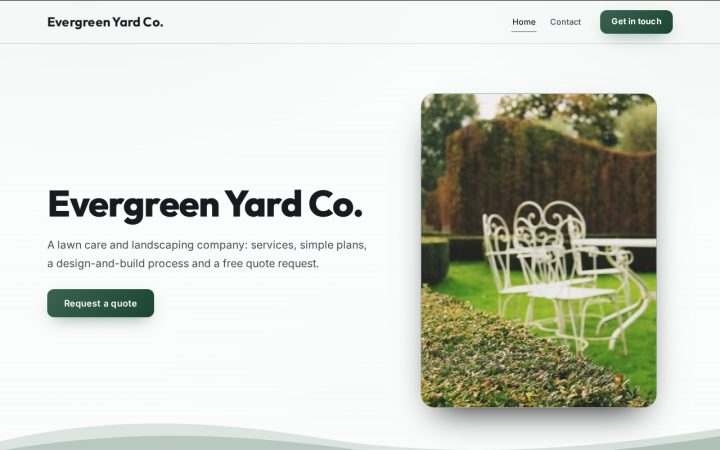 Landscaping & lawn care
Evergreen Yard Co.
-
 Home services (HVAC, plumbing, electrical)
Northbay Comfort
-
 Auto repair & dealerships
Summit Auto Care
-
 Construction & contractors
Ridgeline Build Co.


What you start with
2 pages, ready for your words.
The "Trades & home services" starter begins with these pages and sections. Rename, remove or reorder anything, and add pages up to 10.
-
Home page
- HeaderYour name, what you do and a main button
- ServicesServices / feature cards
- Areas we coverText (with optional photo)
- Recent jobsPhoto gallery
- Need a quote?Call to action banner
-
Contact page
- HeaderYour name, what you do and a main button
- Get in touchContact form
Advice
What makes a good trades website.
List each service plainly
Use the words customers search for ("boiler repair", "fence installation"), one card per service, with a sentence on what is included.
Name the areas you cover
List the towns and neighbourhoods you actually work in. It answers "do you come to me?" and helps you show up for searches in those places.
Show recent jobs
Finished-job or before-and-after photos are the proof most homeowners look for. Describe each one briefly: the job and the area.
Make the quote request work on a phone
Keep the form short: name, phone or email, the job, and the town or postcode. You can ask for photos later.
Mention licences and insurance if they apply
If your trade needs a licence or you carry insurance, say so in plain words. Only state what you can back up.
More on headers, photos, search titles and Google Business Profile: how to make a free business website that gets found.
From the free guide
Tips from our home & field services guide.
Free guide · Home & field services
The Home Services Lead Playbook: Get Found, Answer Fast, Book the Job
- Set up Google Business Profile the way Google expects service businesses to
Hide your address and list the areas you really serve
If you go to customers instead of having them come to you, Google says you should hide your business address. You can list up to 20 service areas by city, ZIP code or similar area, but not as a radius around your shop. Google also says your overall service area shouldn't extend beyond about two hours of driving from where you're based. A virtual office or mailbox you don't actually work from isn't eligible for a profile at all.
- Build a website that turns a search into a booked job
Write service-area pages that are actually about the area
Google's spam policies treat multiple near-identical pages aimed at specific cities as doorway abuse. A useful area page says something real about working there: the neighborhoods you cover, common local conditions like older homes, hard water, sandy soil or HOA rules, photos of nearby jobs, and how scheduling works in that town. If you can't write something specific for a town, list it on one main service-area page instead of giving it a thin page of its own.
- Build a website that turns a search into a booked job
Make the quote form work on a phone with one thumb
Test your quote form on your own phone. Keep it to name, phone, ZIP code, the service needed and a short description, and put a tap-to-call button with your real number at the top of every page. Tell people what happens next and when, for example: we'll text you during business hours to confirm a time. Add short, descriptive alt text to job photos so screen reader users and search engines both understand them.
- Earn reviews and run Local Services Ads within the rules
Ask every customer, the same way, every time
Google lets you encourage genuine reviews, but its policy prohibits offering incentives, discouraging negative reviews, selectively asking only happy customers, and giving staff quotas for a number of reviews or specific wording. The FTC's Consumer Reviews and Testimonials Rule, in effect since October 2024, also bars incentives conditioned on a review being positive. The simplest compliant system is to send every completed job the same request with your Google review link. This is educational, not legal advice, so ask your attorney about any review program you're unsure of.
Free vs. plan
What's free, and what the plan adds.
Free website
$0 to build and publish, no card
- An AI first draft of your pages from a few sentences about your business (it never invents reviews or prices)
- 20 example looks, and 14 starters for different kinds of business
- Up to 10 pages, with drag-and-drop sections: services, price lists, galleries, questions, team, opening hours, maps and more
- Contact forms and your own custom forms; answers come to you
- Customer reviews visitors leave on your site, shown only after you approve them
- A blog, and up to 3 more languages
- Search titles and descriptions for every page, a live SEO score and a site checkup in the builder
- Your own name.epicte.ch address with HTTPS, and a small "Made with EpicTech" line in the footer
Website plan
$29 a month, cancel any time
Everything in the free website, plus:
- Your own domain (like yourbusiness.com), with HTTPS set up for you
- No "Made with EpicTech" line
- Online booking, and RSVPs for your events
- Newsletter signups, and emails to your subscribers
- Members-only pages for customers with an account
- Download your whole site as a file you can keep
- An online shop (coming soon)
FAQ
Questions about a free trades website
Can customers request a quote from the free website?
Yes. Contact forms and custom forms work on the free website, and the answers come to you. Ask only what you need to price the job.
Should I show my business address?
If customers do not come to you, you do not need to. Most service businesses list the areas they cover instead, and hide the address on their Google Business Profile too.
Can I add a page for each area I serve?
Yes, a site can have up to 10 pages. Add a page only when you have something real to say on it, such as a service, an area you cover with local examples, or your prices; near-identical pages help nobody.
How much does it cost?
Nothing to build and publish: your site goes live free on its own name.epicte.ch address with HTTPS and a small "Made with EpicTech" line in the footer. No card needed. The website plan ($29 a month) adds your own domain, online booking, event RSVPs, newsletters, members-only pages and a download of your site, and removes that line. Cancel any time and the site stays live on its free address.
Other kinds of business
Not quite your business?
Start your trades website free.
Build it, publish it on its own address, and upgrade only if you need more. Prefer it done for you? Our team can build it.