Free website · Health & wellness practitioners
A free website for health and wellness practitioners.
Massage therapists, physiotherapists, counsellors, nutritionists and other practitioners need a site that explains sessions clearly, answers first-visit questions and feels calm and trustworthy. The wellness starter is built for that.
- Free to build and publish
- No card needed
- Up to 10 pages

Example looks
3 looks built on this starter.
Example sites for sample businesses, made with the builder. Open one to look around, then start with its colours, fonts and pages; names, details and photos are placeholders for yours.
-
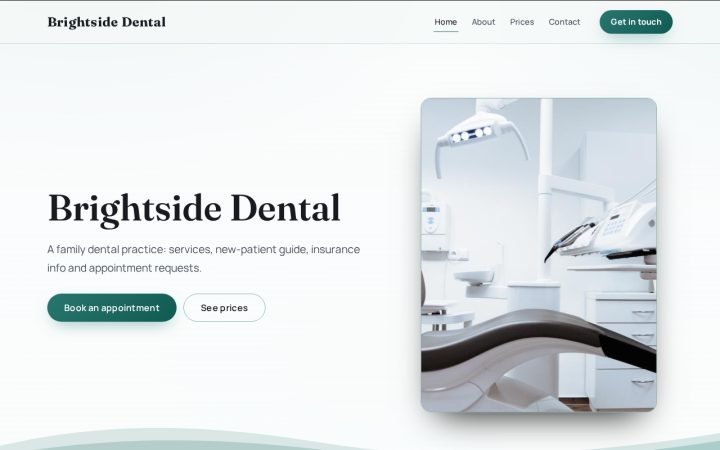 Dental practices
Brightside Dental
-
 Salons, barbers & med spas
Lumen Aesthetics
-
 Medical & specialty clinics
Northgate Family Clinic


What you start with
4 pages, ready for your words.
The "Health & wellness practice" starter begins with these pages and sections. Rename, remove or reorder anything, and add pages up to 10.
-
Home page
- HeaderYour name, what you do and a main button
- SessionsServices / feature cards
- Your first visitText (with optional photo)
- Book an appointmentWebsite planOnline booking
- What clients sayCustomer reviews
-
About page
- HeaderYour name, what you do and a main button
- About meText (with optional photo)
- The spacePhoto gallery
-
Prices page
- HeaderYour name, what you do and a main button
- Price list
- CancellationsText (with optional photo)
- QuestionsQuestions & answers
-
Contact page
- HeaderYour name, what you do and a main button
- Get in touchContact form
- Opening hours
Sections marked "Website plan" (online booking, the shop and newsletter signups) work on the website plan ($29 a month). On a free website they stay hidden, and everything else works.
Advice
What makes a good wellness practice website.
Explain each session
What it is, who it helps, how long it lasts and what it costs. Plain language works better than clinical terms for most visitors.
Describe the first visit
The starter has a "Your first visit" section: what to expect, what to wear or bring, and how long it takes.
Publish your cancellation policy
The Prices page includes a "Cancellations" section, so the policy is clear before anyone books.
Be careful with health information
A general contact form is fine for "I would like to book a massage". Do not ask for medical history through it; if health privacy rules apply to you, use intake tools built for that.
Make claims you can stand behind
Describe what you do and your qualifications, and avoid promising cures or outcomes.
More on headers, photos, search titles and Google Business Profile: how to make a free business website that gets found.
From the free guide
Tips from our healthcare guide.
Free guide · Healthcare
The Independent Practice Playbook: Fewer No-Shows, Safer Patient Data
- Let your website handle the easy front-desk work
Answer the questions behind your phone calls
New patients usually want the same things before they commit: which insurance plans you accept, whether you're taking new patients, what the first visit involves, what to bring and where to park. Put those on one plain New Patients page and link it from your booking confirmation. If you see uninsured or self-pay patients, the No Surprises Act requires you to give a good faith estimate of expected charges when they schedule or ask, so say on that page how to request one. Keep your insurance list current, because a stale list turns into frustrated calls later.
- Let your website handle the easy front-desk work
Build for patients who use screen readers or larger text
Accessibility is part of good patient care, and for many practices it's also a legal requirement. HHS's Section 504 rule requires recipients of HHS federal financial assistance to make their websites and mobile apps conform to WCAG 2.1 Level AA. In May 2026, HHS extended the compliance dates to May 11, 2027 for recipients with 15 or more employees and May 10, 2028 for those with fewer. Ask your compliance advisor or attorney whether the rule applies to your practice. Either way, start with the basics: real alt text, readable contrast, labeled form fields, and forms that work with a keyboard alone.
- Move intake online without creating a HIPAA problem
Know when a web form becomes a HIPAA form
A form that asks only for a name, phone number and preferred time is different from one that asks about symptoms, medications, insurance or the reason for a visit. Once a form collects protected health information for your practice, every vendor that receives, stores or transmits it is a business associate and must sign a business associate agreement (BAA). That can include the form tool, the website host if submissions are stored there, and the email service if submissions are emailed. A common gap is a website form that emails full intake answers to a regular office inbox. Talk to your compliance advisor if you're unsure where a form falls.
- Market the practice without leaking patient data
Set up Google Business Profile the way Google expects for practices
Google's guidelines treat a practice and its individual practitioners differently. When several clinicians work at one location, the practice gets its own profile, and a public-facing practitioner can have a separate one under their own name. A solo practitioner with a practice brand should use a single profile named in the format brand: practitioner name. Google also says a practitioner shouldn't have multiple profiles to cover different specializations. Keep hours, holiday closures, phone number and booking link accurate on every profile.
- Market the practice without leaking patient data
Ask every patient for reviews, and reply without confirming they're a patient
Google's review policy lets businesses ask for reviews but bans incentives and selectively asking only happy customers. The FTC's rule on consumer reviews, effective October 2024, also bans incentives tied to positive or negative sentiment. So ask everyone the same way, for example in a post-visit message. When you reply, never confirm that someone is your patient or mention their care. HHS has settled with dental practices that disclosed patient information in replies to online reviews. A safe reply thanks the reviewer and invites them to call the office.
Free vs. plan
What's free, and what the plan adds.
Free website
$0 to build and publish, no card
- An AI first draft of your pages from a few sentences about your business (it never invents reviews or prices)
- 20 example looks, and 14 starters for different kinds of business
- Up to 10 pages, with drag-and-drop sections: services, price lists, galleries, questions, team, opening hours, maps and more
- Contact forms and your own custom forms; answers come to you
- Customer reviews visitors leave on your site, shown only after you approve them
- A blog, and up to 3 more languages
- Search titles and descriptions for every page, a live SEO score and a site checkup in the builder
- Your own name.epicte.ch address with HTTPS, and a small "Made with EpicTech" line in the footer
Website plan
$29 a month, cancel any time
Everything in the free website, plus:
- Your own domain (like yourbusiness.com), with HTTPS set up for you
- No "Made with EpicTech" line
- Online booking, and RSVPs for your events
- Newsletter signups, and emails to your subscribers
- Members-only pages for customers with an account
- Download your whole site as a file you can keep
- An online shop (coming soon)
FAQ
Questions about a free wellness practice website
Can clients book appointments online?
Online booking is part of the website plan ($29 a month): visitors pick an open time and get a calendar invite. On a free website the booking section stays hidden, so visitors reach you through your contact form, phone or email instead. Switch the plan on whenever you want online booking.
Can I collect intake or health forms on the free website?
Custom forms work on the free website, but they are general web forms, not a HIPAA intake system. Keep them to contact and booking details, and use your practice's own intake tools for health information.
Where do I put my qualifications?
On the About page ("About me"): your training, registrations and memberships, with your photo.
How much does it cost?
Nothing to build and publish: your site goes live free on its own name.epicte.ch address with HTTPS and a small "Made with EpicTech" line in the footer. No card needed. The website plan ($29 a month) adds your own domain, online booking, event RSVPs, newsletters, members-only pages and a download of your site, and removes that line. Cancel any time and the site stays live on its free address.
Other kinds of business
Not quite your business?
Start your wellness practice website free.
Build it, publish it on its own address, and upgrade only if you need more. Prefer it done for you? Our team can build it.